Robotics classes for kids give children hands-on skills in coding, engineering, and problem solving. Parents want classes that match each child’s age, interest, and learning style. This guide lists what children learn, the right ages for topics, common class formats, and clear steps to pick a good program.
Key Takeaways
- Robotics classes for kids build essential STEM skills like coding, electronics, and mechanical thinking while boosting teamwork and communication.
- Age-appropriate robotics programs use platforms such as LEGO Education for younger kids and Arduino or VEX for older students to match skill levels.
- Parents should evaluate classes based on curriculum relevance, instructor quality, safety measures, and opportunities for hands-on trial sessions.
- Regular challenges in robotics classes develop persistence and problem-solving through planning, testing, and revising projects.
- Choosing the right robotics class helps children stay curious, learn from failure, and steadily progress in both technical and soft skills.
Why Robotics Classes Matter For Kids
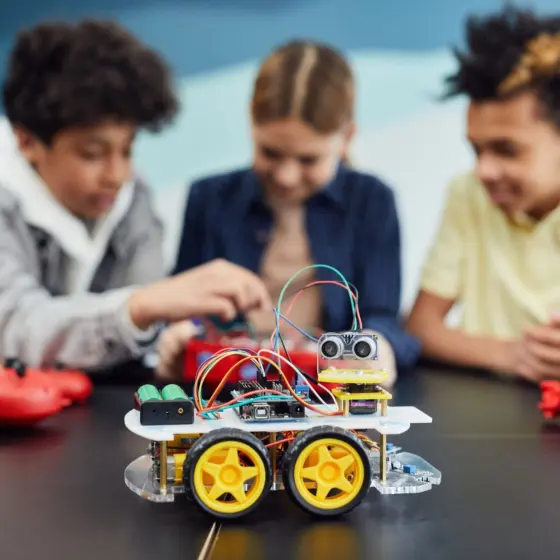
Robotics classes for kids teach practical skills that transfer to school and life. They teach coding, basic electronics, and mechanical thinking. They also teach teamwork and communication. Students build circuits, program simple robots, and test designs. Teachers set small challenges that require trial and error. Children learn to plan, test, and revise. Parents report gains in confidence and persistence. Schools use robotics projects to make math and science concrete. Employers value these skills later in work. Early exposure makes later technical topics easier to learn.
Beyond specific technical skills, robotics classes for kids foster a mindset of experimentation and iterative improvement. When a robot does not behave as expected, students troubleshoot sensors, adjust code, or reconfigure mechanisms—practical lessons in debugging that mirror problem solving in many fields. Class activities also provide natural contexts to practice communication: students document their design decisions, present results to peers, and reflect on what worked. For many children, robotics is the first place they see a tangible connection between an abstract idea (like an algorithm) and a physical outcome (a motor turning or a robot navigating a course).
Core Skills Kids Gain From Robotics (STEM, Soft Skills, Creativity)
Children gain STEM skills in robotics classes for kids. They learn sequencing, variables, and sensors. They practice measurement and basic physics. Classes also grow soft skills. Students share tasks, explain ideas, and accept feedback. Teachers assign timed tasks that develop focus. Robotics projects invite creativity. Kids design robot bodies, pick colors, and invent tasks. They link creative choices to function. This link helps them think like small engineers. Parents can watch projects to see specific gains in logic and imagination.
Specific examples of skills include: writing simple block-based programs that use loops and conditionals; wiring a small circuit and understanding why a motor needs a power source and ground; interpreting sensor output (distance, light, or touch) to make decisions in code. Soft skills cultivated in robotics classes for kids include collaboration when teams split roles (builder, coder, tester), project planning when breaking a goal into subtasks, and resilience when a design must be rebuilt. Creativity shows up when children invent new challenges for their robots or repurpose parts to solve unexpected problems.
Best Ages And Learning Milestones
Robotics classes for kids suit different ages and milestones. Younger children need simple, visual tasks. Older children can handle code and circuits. Instructors should set clear, age-appropriate goals. Parents should ask for sample lesson plans and expected milestones. Good programs show learning maps and assessment checkpoints. They also allow children to repeat projects at higher difficulty. Progress should feel steady, not rushed. Class size and instructor ratio should match the child’s age for safe tool use and focused guidance.
Typical milestones by age group often look like this (as a general guide): preschool/early elementary—basic cause-and-effect with simple programmable toys and drag‑and‑drop interfaces; upper elementary—sequence logic, basic sensors, and construction techniques; middle school—text or block-to-text hybrid coding, intermediate electronics, and multi-part projects; high school—advanced programming, custom circuits with microcontrollers, and competition-level engineering. A strong robotics class for kids will map activities to these milestones, with checkpoints such as “can program a robot to follow a line” or “can design a mechanism to lift an object,” and provide differentiated paths for beginners and advanced students.
Types Of Robotics Classes: Curriculum, Format, And Platforms
Robotics classes for kids appear in many forms. Schools offer elective courses during the day. Community centers host after-school clubs. Private companies run weekend classes and holiday camps. Curriculum can be project-based, competition-focused, or skills-focused. Platforms include LEGO Education, VEX, Arduino, and micro:bit. Each platform fits a skill level. LEGO suits early learners. VEX and Arduino suit older students who want deeper electronics. Micro:bit offers a low-cost entry into sensors and simple code. Curriculum choice should reflect the child’s interest and future goals.
Format matters: a weekly after-school class may emphasize steady skill-building and homework-like practice, while an intensive camp concentrates learning into hands-on bursts and rapid prototyping. Competition programs (for example, local robotics leagues) emphasize iterative design under constraints and often teach project management and teamwork under pressure. In contrast, maker-style classes prioritize open-ended exploration and creative tinkering. When evaluating platforms, consider longevity (can the kit be expanded?), community resources (tutorials and sample projects), and whether the platform supports a natural progression from visual coding to text-based languages so children can scale their learning across years.
How To Choose The Right Class For Your Child
Parents should start by listing the child’s interests and current skills. They should ask if the program uses age-appropriate curriculum and which platform it uses. Parents should check instructor credentials and class size. They should request a sample lesson or trial session. They should confirm safety rules, tool supervision, and refund policies. Parents should compare cost against contact hours and materials included. They should read recent parent reviews and ask for video samples of student work. Finally, parents should choose a program that keeps the child curious and lets them fail and try again.
When evaluating options, use a short checklist: does the class offer measurable learning goals? Is there a clear progression from beginner to intermediate tasks? Are instructors experienced with children and the chosen platform? How are mistakes framed—are they treated as learning steps? Also consider logistics—schedule, location, and how well the class fits the child’s social needs. If possible, arrange a trial lesson so the child can experience the teaching style and hands-on activities. After enrollment, track progress by asking for regular updates, viewing student portfolios if available, and encouraging reflection on what was learned each session. The right robotics classes for kids will combine engaging projects, consistent skill progression, and supportive instructors to keep discovery enjoyable and meaningful.